


GoDaddy: Websites & Marketing
4.32.26K Reviews
App Specs
- Version
- 9.12.1
- Updated On
- License
- Free
- Downloads
- 10,000,000+
- Developer
- GoDaddy Operating Company, LLC
- Categories
- Business
- Platform
- Android
Screenshots

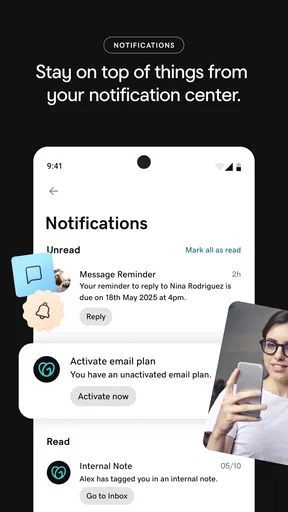
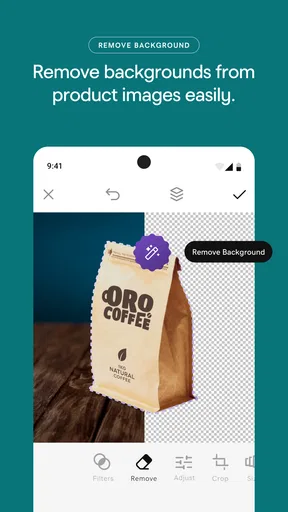
 Analysis by AppCompare
I treat a business website as a small but ongoing job: it needs a clear purpose, useful information, and occasional attention after launch. That is the lens I use for GoDaddy: Websites & Marketing. It is a business app from GoDaddy Operating Company, LLC, and its appeal is bringing website work and marketing tasks into one place. I would consider it if I wanted to get a straightforward business presence moving without first learning web development, while keeping in mind that a convenient all-in-one setup is not automatically the best fit for every project.
Decide what the site needs to do first
Before opening a builder, I find it helps to decide what a visitor should be able to understand or do in a minute. A neighborhood service business may need its services, service area, contact details, and a simple way for prospective customers to take the next step. A small shop may need a different set of priorities. Writing down those essentials first makes it easier to choose a template and avoid spending time polishing decorative details before the useful information is in place.
That planning also helps set realistic expectations. GoDaddy can bring site creation and marketing tasks together, but it cannot decide your offer, write accurate business details, or make unclear messaging persuasive. I would gather the text and images I actually want customers to see before building. If I were still unsure what the business does or who it serves, I would work that out before treating a website app as the solution.
Keep the workflow manageable
For me, the practical benefit of a mobile business app is not simply being able to do everything from a phone. It is having a place to check the site and handle small tasks when they come up, rather than letting each one become a separate project. GoDaddy is free to download, is rated for Everyone, and has a 4.4 average from around 42,000 ratings. Those figures suggest broad use, but they do not tell me whether its particular workflow will suit an individual business; that depends on how much control and complexity the owner needs.
A useful habit is to treat a change as a small review, not just a quick edit. If I update a service description, I would also check that the wording still makes sense on a phone and that the contact path remains easy to spot. That kind of check is especially helpful when making changes between customer conversations, because a tidy-looking edit can still leave the page less clear than it was before.
First Impressions Matter
Let’s be honest; the first thing we notice about any app is the user interface. When I opened GoDaddy: Websites & Marketing, I was greeted with a sleek and clean design. Everything seemed intuitively placed, which was a huge relief because, let’s face it, nobody has time to play detective when all you want to do is start building a site. The app strikes a balance between being feature-rich and user-friendly, which is no small feat.
Building Your Dream Website
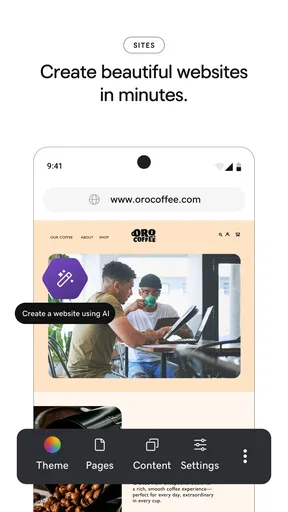
Building a website with GoDaddy is like having a buffet of options at your fingertips. You start by choosing from a range of templates that cater to various industries. Whether you’re running a bakery or a tech startup, there’s something for everyone. The drag-and-drop feature is particularly handy. I could easily add sections, images, and text blocks without any coding knowledge. Plus, the live preview function means you can see your changes in real-time, which is pretty nifty.
Worth Reading Before You Choose

Flipboard Shows What News Apps Must Do Beyond the Feed

Switching to Android Auto Means Rethinking Your Driving Routine

Google Calendar Makes a Crowded Week Easier to Manage

Ludo King Makes the Most of the Minutes Between Plans

Baby Panda World Brings Quick Play to Modern Phones, but Its Game Library Feels Busy

ESPN’s Live Game View Makes Following Close Games Easier
And let me tell you, the customization options are vast. You can tweak colors, fonts, and layouts to your heart’s content. There’s a certain satisfaction in watching your vision come to life with each click.
Make each edit serve a customer
Templates are most useful when I treat them as a starting structure rather than a finished identity. For a bakery, for example, the key question is not whether the page looks like a bakery template; it is whether someone can quickly find the products, location, and way to get in touch. I would replace sample content promptly and keep the first screen focused on what a visitor came to learn. A polished layout cannot compensate for old hours or vague service descriptions.
The live preview is also more than a visual nicety. I would use it to check the order of information: does the main message appear before less important details, and can a visitor scan the page without having to interpret a crowded set of sections? When editing images, I would choose ones that explain the business rather than merely fill space. Those small decisions help a template feel intentional without requiring custom code.
Marketing Tools Galore
Now, onto the marketing tools. This is where GoDaddy really shines. They offer a comprehensive suite of tools to help you reach your audience. From SEO optimizations to email marketing campaigns, you’re covered. The app even provides insights into how your site is performing, which is crucial for making informed decisions.
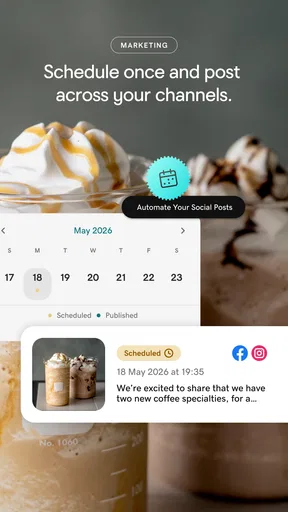
One feature I found particularly useful was the social media integration. You can manage your social media presence directly from the app, which saves a ton of time. No more bouncing between platforms; everything is under one roof.
Turn marketing into a repeatable routine
I would not treat the presence of marketing tools as a reason to send more messages or make more posts. A better use is to connect each activity to a real business need: tell existing customers about a change, make a seasonal service easier to discover, or direct interested people to a page with the relevant details. Before sending an email or sharing an update, I would check that the destination page is current and that the next step is obvious. That simple sequence keeps the website and outreach from contradicting each other.
For instance, if a local repair business has a busy day and notices the same customer question coming up repeatedly, the owner could make the answer easier to find on the site, then share that page through the channels they already use. This is a more sustainable workflow than trying to maintain every marketing channel every day. The app can help bring tasks together, but the owner still has to choose a realistic cadence and decide what is worth communicating.
Performance insights can be useful as prompts for investigation, not as instructions to change everything. If a page seems to attract attention but does not lead to inquiries, I would first review whether the information is clear and whether the contact route is visible. I would avoid drawing sweeping conclusions from a single observation. For a business that needs deep attribution or intricate campaign reporting, a dedicated analytics or marketing platform may be a better companion or a better fit.
Mobile Experience
In today’s world, having a mobile-friendly site is non-negotiable. Thankfully, GoDaddy doesn’t disappoint. The app ensures that your site looks great on any device. In fact, I tested my site on various screen sizes, and it was as smooth as butter each time. Kudos to GoDaddy for keeping mobile users in mind.
Use a phone for checks, not every decision
Mobile access makes sense for quick corrections: fixing a typo, checking a page before sharing it, or reviewing whether a recent change still reads clearly. I would be more cautious about making a major redesign on a small screen, especially if the page has many sections or the wording needs careful comparison. A phone is convenient for keeping a business moving, but convenience can encourage rushed edits. For substantial changes, I would set aside time to review the whole page rather than judging each element in isolation.
That distinction matters for anyone wondering whether the app replaces a desktop workflow. I see it as useful for managing a business presence while away from a computer, not as a reason to force every detailed task onto a phone. If precise layout control, complex content production, or a highly customized site is central to the project, I would compare the experience with desktop-focused builders before committing to a workflow.
Where the convenient approach can fall short
An all-in-one setup trades some separation for convenience. Keeping site work and marketing activity close together can reduce context switching, but it may not provide the depth a specialist needs in every area. A business with unusual design requirements, a large content operation, or detailed technical needs should compare GoDaddy with a dedicated website platform or separate marketing tools. I would not choose a builder just because it covers several jobs; I would choose it if its way of handling those jobs matches the work I actually do.
There is also a practical cost consideration beyond downloading the app. It is free, while in-app purchases range from $4.99 to $69.99 per item. I would review what a particular purchase covers and whether it solves a current need before paying, rather than assuming every business needs an upgrade. A simple information site may have different requirements from a business with ongoing campaigns or a more involved online presence. The right decision depends on the job, not on a desire to unlock features for their own sake.
Support and Assistance
We all hit a snag every now and then, and having reliable support is crucial. GoDaddy offers 24/7 support, and the community forums are a goldmine of information. I had a minor hiccup with one of the integrations, and the customer service team was prompt and helpful. It’s reassuring to know that help is just a click away.
When I run into a problem, I would first describe the goal and the point where the workflow stopped, then check whether the issue is with the page content, a connected service, or the wider setup. That makes a support conversation more useful than simply saying that something is broken. Community discussions can offer practical ideas, but I would still check that a suggested fix applies to my own situation before changing a live business page.
Who will get the most from it
I think this app is best suited to an owner who wants a presentable business site and a practical way to handle related marketing without building a technical stack from scratch. A solo service provider, a small local business, or someone testing a new venture may value having the main tasks close together. GoDaddy has more than 10 million installs, which reflects its reach, but popularity alone is not a reason to pick it. The useful question is whether the app’s approach makes it easier for you to keep your online information accurate.
I would look elsewhere if I needed extensive control over the underlying site, a highly specialized publishing workflow, or advanced campaign analysis as a central part of my work. A dedicated website builder may be preferable when design flexibility is the priority; specialist marketing software may suit a team that needs deeper campaign tools. Those alternatives can also mean managing more services, so there is a real trade-off between focused capability and having a more unified routine.
For someone just starting, the most sensible test is to build a small, useful version of the site rather than trying to create the final, perfect brand experience at once. Add the information customers need, inspect it on a phone, and see whether the editing and marketing workflow feels manageable. GoDaddy’s current version is 8.5.1, and it supports Android 6.0 and later, so I would check device compatibility before planning to use it on an older phone.
Final Thoughts
So, is GoDaddy: Websites & Marketing the ultimate tool for website building and marketing? In my humble opinion, it’s pretty darn close. It’s perfect for those who want to create professional-looking websites without the hassle of learning code. The marketing tools are robust enough to give your business a competitive edge, and the support is top-notch.
Whether you’re starting a new venture or looking to revamp your existing site, GoDaddy offers a seamless and enjoyable experience. It's like having a Swiss Army knife for all your online needs. Give it a try, and you might just find it’s the perfect fit for you.
A sensible way to decide
I would recommend approaching it as a working tool, not a one-time project: make the site useful, check it after meaningful changes, and keep marketing activity tied to information customers can act on. That routine is where an all-in-one business app can earn its place. If you prefer a simple setup and value convenience over specialist depth, GoDaddy is worth considering; if your site or campaign needs are unusually complex, compare focused alternatives before settling in.
The app is free to start with, rated for Everyone, and includes optional in-app purchases, so the commitment can begin with seeing whether its workflow fits. For me, that is the deciding point: not whether one app can do a little of everything, but whether it helps me keep the important parts of a small business’s online presence clear and current. If that is what you need, it can be a practical place to begin.
Pros
- User-friendly interface for beginners.
- Wide range of customizable templates.
- Integrated marketing tools available.
- Excellent customer support services.
- Mobile app for on-the-go management.
Cons
- Limited free options available.
- Some advanced features are paid.
- Occasional app performance lags.
- Customization can be restrictive.
- Learning curve for complex tools.
FAQs for GoDaddy: Websites & Marketing
What features does the GoDaddy: Websites & Marketing app offer?
The GoDaddy app provides a comprehensive suite of tools to create and manage your website and marketing campaigns. It includes website building with customizable templates, SEO optimization, social media integration, email marketing, and analytics. This app is designed to be user-friendly, catering to both beginners and seasoned web developers.
Is the GoDaddy app suitable for beginners without technical skills?
Yes, the GoDaddy app is designed with beginners in mind, offering an intuitive drag-and-drop interface and pre-designed templates. These features allow users without coding or technical knowledge to build professional-looking websites easily. Additionally, the app provides helpful guides and customer support to assist users in getting started.
Can I manage my marketing campaigns directly from the app?
Absolutely, the GoDaddy app allows you to manage your marketing campaigns directly. You can create and schedule social media posts, design email marketing campaigns, and track their performance using built-in analytics. This integration makes it easier to coordinate all your marketing efforts in one place, improving efficiency and reach.
What kind of support does GoDaddy offer to app users?
GoDaddy offers robust customer support for app users, including 24/7 customer service via phone and live chat. Additionally, there is a comprehensive help center with articles, videos, and community forums. This extensive support network ensures that users can resolve issues and maximize the app's potential effectively.
Are there any costs associated with using the GoDaddy app?
While the GoDaddy app itself is free to download, certain features and services require a subscription. These include premium templates, enhanced marketing tools, and additional storage. Pricing varies based on the package chosen, so it's recommended to review the options to find the plan that best suits your needs.


